I have a confession to make - when I see an audio mixing program to review, I usually try to pass it on to someone else. They're just so complicated, especially for a tone-deaf writer like me! When I saw trakAxPC, however, I noticed that it is supposed to be especially suitable for beginners. This has to be the one for me, right?!
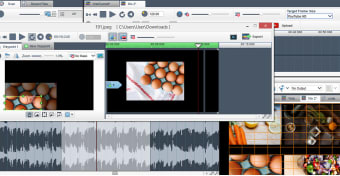
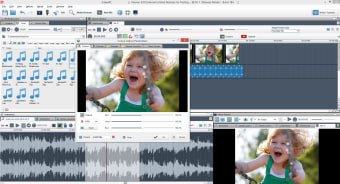
Well, trakAxPC might just have cracked it. This application is very user-friendly, which is half the battle. The whole interface can be customized, from the position and size of the panels, to which elements show up when you are using the application. Even managing your tracks is simple, with drag and drop capabilities and extensive context menu options. trakAxPC also comes with a great selection of online videos, tutorials, guides and help, so you'll have plenty of support if it is your first venture into the world of audio mixing.
Even though the program is especially suitable for beginners, that doesn't mean that it's a soft option - trakAxPC has all the audio (and video) editing options you would expect, although the effects don't quite stretch to the same levels as some editing apps aimed at more advanced users. Even so, trakAxPC allows you to do all the cutting, copying, mixing and synching that you would expect in any other editing program.
trakAxPC provides a gentle but professional gateway to the world of audio and video editing.
trakaxPC makes it easy for anyone to create great videos.
trakAxPC allows you to edit and mix audio, video and photos. Whatever you want to create, with trakaxPC you have the tools you need to make something amazing.
Easy to Use Interface
With its friendly user interface and easy to learn technology, trakAxPC is a great place to start creating interesting videos.
Picture-in-Picture / Collage
Picture-in-Picture is a great feature which allows you to display two or more videos / images together in the same screen.
Add Text & Titles
Add Text Overlays as well as start and end credits to your videos. Control Sizings, Placements, Colours, Backgrounds and more
Free Support
trakAxPC has built a loyal customer base founded on customer support. We answer each and every question personally from our base in Dublin, Ireland.
HD Export
Full HD is supported, so your movies look crystal clear. Quickly and easily convert all major file types with our one click converter.
Direct Upload to YouTube
Upload your videos directly to YouTube - Full HD, HD, BestQuality and Regular Upload.
Color Correction
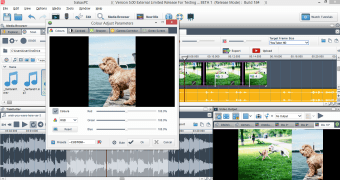
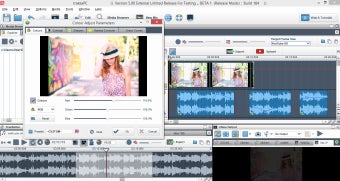
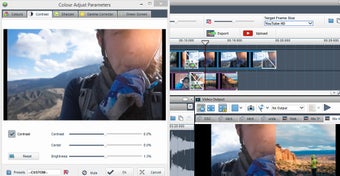
Easily control the colours and contrast of your photos and videos. Sharpen your images and videos and have sophisticated controls over the brightness.
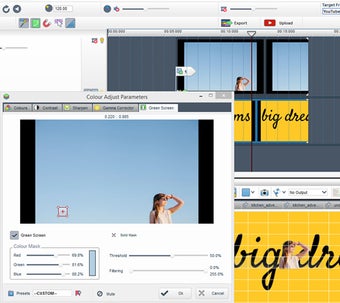
Green Screen
Basically 'Green Screen' removes a background from the subject of your photo or video. This effect works best when your subject is against a solid background color.
Cropping
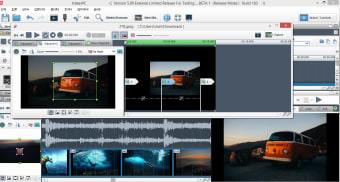
Crop videos and Photos - crop out unwanted footage and pick out areas of interest.
Motion & Panning
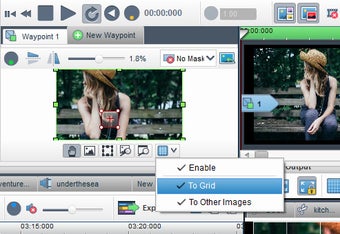
Add multiple crops, movement between crops and complex pans and zooms to your videos and photos.
Will not let you use trail version anymore. website is no more. not good at all
Anonymous user
Trakax is Hands Down The Most Gratifying Purchase I've Ever Made. You simply won't find another software value like Trakax. The controls are intuitive enough that you can begin doing most things as soon as you install it. If you decide to try something a little more complicated, short videos show you how, and they're viewable right there in the program. You can even activate a tips window which displays quick usage tips pertinent to the function currently under the mouse position.There isn't another software maker anywhere that can match the Trakax team for user support. No matter how simple or complicated your question is, you'll get an answer quickly. They take a genuine interest in each user and his question, and they'll stick with you till your issue is resolved.Download this program. You won't be sorry. Pros: Best ValueBest Support
Anonymous user
The best value paid for video editor out there, bar none.. For the price, features and extensive and efficient functionality that it offers, it makes it both easy to use for the beginner, whilst giving more advanced features for the prosumer that you would only see in products costing 3 or 4 times the price. Pros: Range of features Cons: Interface could do with minor tweaks, especially the icon bar at the top, which is too large and takes up a little too much of the top of the screen.
Laws concerning the use of this software vary from country to country. We do not encourage or condone the use of this program if it is in violation of these laws. Softonic may receive a referral fee if you click or buy any of the products featured here.